The handle jumps.
Compare 0° and the requested 45° image. The handle shifts from the right side to the left. A prompt angle is not evidence that the camera reached that pose.
Generate the views.
Check their agreement.
Understand the soft points in between.
ACTUAL GEMINI OUTPUTS · REQUESTED ANGLES, NOT CALIBRATED CAMERA POSES · EIGHT-VIEW PILOT
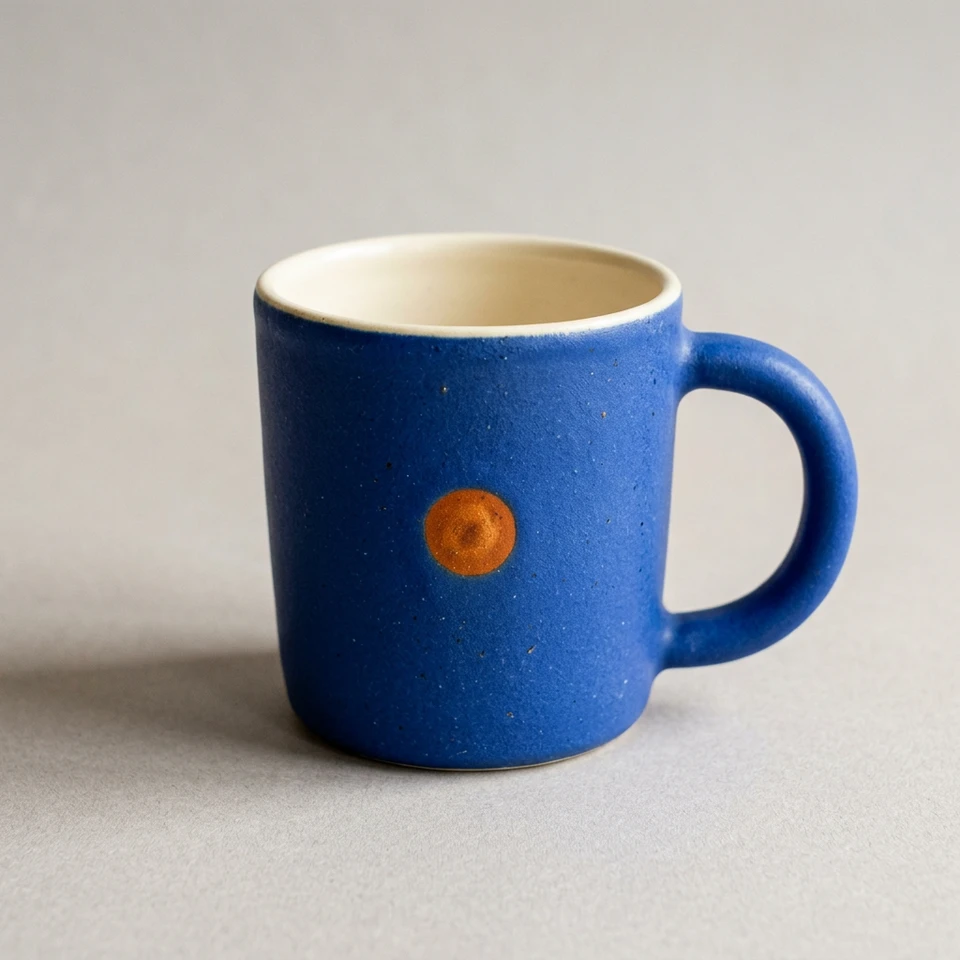
Compare 0° and the requested 45° image. The handle shifts from the right side to the left. A prompt angle is not evidence that the camera reached that pose.
The front view has one mark. In the requested 315° view it is absent. The sequence needs geometric checks, not just a judgement that each frame looks attractive.
Eight generated views are a small consistency pilot. No camera calibration, SfM reconstruction or Houdini training was performed for this set.
PROCEDURAL TEACHING MODEL · NOT RECONSTRUCTED FROM THE GEMINI IMAGES
Depth-sorted translucent footprints accumulate into an image.
3D centre + covariance + opacity + colour → imageTHE IDEA / APPEARANCE NEEDS AGREEMENT
A Gaussian splat is a coloured, translucent volume with a centre, scale and orientation. Project many of them into the camera and blend their footprints. The result can reproduce photographed appearance without a triangle mesh.
Learning those parameters requires images that agree about one scene. AI-generated views can be useful experiments, but a plausible unseen side is still a hypothesis. Camera alignment is the first practical gate.
Start with a matte object, a clear silhouette and an asymmetric detail. Our mug has a blue body, cream rim, one D-shaped handle and one orange mark. These features let you inspect identity, rotation and occlusion. A smooth featureless sphere would make those questions harder.
Generate one master. Supply that same image to every angle request, rather than letting each new frame redefine the object. Fix the background, camera elevation, distance and light in the prompt. Save the exact prompts and original outputs.
Rephotograph the exact same mug in the master image.
Camera azimuth: [angle] degrees; elevation: 20 degrees.
Only the camera moves. Preserve the rim and handle geometry.
Do not relocate the orange mark to keep it visible.
Keep subject scale, background and diffuse lighting fixed.
One view. No collage or labels.
Try: scrub the generated views. Use the guides to compare framing. Watch details that should disappear behind the body. Treat each requested angle as unverified until it is estimated or checked against known geometry.
Structure from Motion matches features across overlapping images, then estimates camera poses and a sparse scene. The training input needs this posed image set. A folder of images with angle labels does not provide calibrated cameras.
For a real capture, walk around a stationary object under steady light. Include multiple heights and neighbouring views with overlap. Inspect focus, exposure and coverage of the rim and handle opening. A camera sequence must explain the images without moving or changing the object.
For this Gemini pilot, first check how many cameras register, whether their positions form a plausible orbit and whether the sparse points agree with the mug. If alignment fails, adding training steps will not solve the missing agreement. Use denser real photographs or render a known 3D object with exported cameras for a controlled baseline.
Try: list three differences between the generated images that could disturb feature matching. Keep “looks good” and “registered successfully” as separate observations.
Each Gaussian has a 3D centre and three local axes with different scales. Those axes form a covariance matrix. The camera projects that covariance into a 2D ellipse. A long axis can become foreshortened when viewed from another side.
This browser model samples a known mug surface and uses an orthographic camera. Its local tangent directions and normals define the ellipses. A full perspective renderer uses the local camera projection Jacobian. The demo is built to reveal the mechanism; it has not learned a mug from the generated images.
Try: choose Ellipses. Orbit to 90° and raise the camera elevation. Watch which ellipses narrow and which widen.
A Gaussian footprint contributes most strongly at its centre. Its opacity falls with distance. Sort footprints by depth and blend them to form the visible image. The demonstration draws from far to near and uses a radial-gradient approximation to the Gaussian profile.
Small footprints reveal gaps between samples. Larger ones close gaps, but wash out edges and can soften the orange mark. More samples improve coverage at a computational cost. The real learning process changes positions, colour, scale and opacity to reduce differences between rendered and input views.
Try: choose Splats. Set Splat count to 400 and Footprint size to 0.5×, then increase each separately. Notice how smoothness and silhouette accuracy change.
Begin with an aligned, medium-resolution image set and a short preview. On a Houdini version with ML Train GSplats, select the appropriate posed data set, choose initialization, then cook training. Review held-out views and monitor the point count as well as the loss. Exported PLY and USD results can return to Houdini for inspection.
Memory depends on image resolution, cached images and the Gaussian population. Start downscaled, keep image caching modest and use a bounded point budget. Record your GPU, resolution, camera count, steps, elapsed time and peak memory. A successful run on another laptop does not establish timings or compatibility for yours.
This study ran image generation through Gemini and its teaching renderer in a browser on an Apple M4 Pro laptop. It did not install Houdini or run a training backend. Check the selected trainer’s hardware requirements before setup; a CUDA-only trainer cannot use an Apple GPU directly.
Try: write a pass/fail gate for each stage: cameras register → preview trains → held-out render agrees → export reloads. Record a failed gate before increasing the workload.
Once Gaussians exist, their centres and local frames can be transformed. A deformation must move the orientation and covariance along with the centre; otherwise the footprints no longer fit the new form. In this model the twist rotates positions, tangents and normals together.
The light control uses normals known from the procedural surface and multiplies the stored colour by a simple lighting term. Ordinary trained splats store appearance, including baked lighting, rather than a complete material and surface-normal model. Reliable relighting needs additional information or a suitable representation.
Try: choose Edit and increase Deformation. Orbit the result. Move the light. Download the Gaussian JSON to inspect the centres, axes and scales; its metadata states that this is a procedural teaching model, not a trained checkpoint.
YOUR TURN / TWO INPUTS, ONE TEST
Compare a real-photo orbit with the generated pilot. Use the same alignment checks and a held-out view. Which set preserves the handle, rim and orange mark through the turn?
Report image quality, camera registration and reconstruction quality separately. The useful result may be a successful reconstruction, or a clear explanation of why the input failed.
Inspect the views again ↑The offline HTML contains all eight generated views, the procedural Gaussian model, the Canvas renderer and the controls. Open it in a browser and edit it in a text editor. No installation or cloud account is needed to explore the saved study.
Download the offline starter ↓
Separate source: procedural Gaussian model · rendering and interaction · pilot manifest and prompts.